

Even if your part has perfect geometry and wide-open tolerances, your manufacturing quote can still skyrocket if you choose the wrong raw material or force a shop to use an inefficient machining process.
Material selection and machine routing act as massive cost multipliers. Understanding how machinability and process selection affect cycle time will help you lock in a lower price before the first chip is even cut.
1. Machinability Ratings: The Speed Limit of Metal
Not all metals cut the same. The ease with which a material can be cut without rapidly wearing down the tool is called its machinability. A material with poor machinability requires the CNC machine to run at slower spindle speeds and feed rates, drastically increasing the hourly cycle time you pay for.
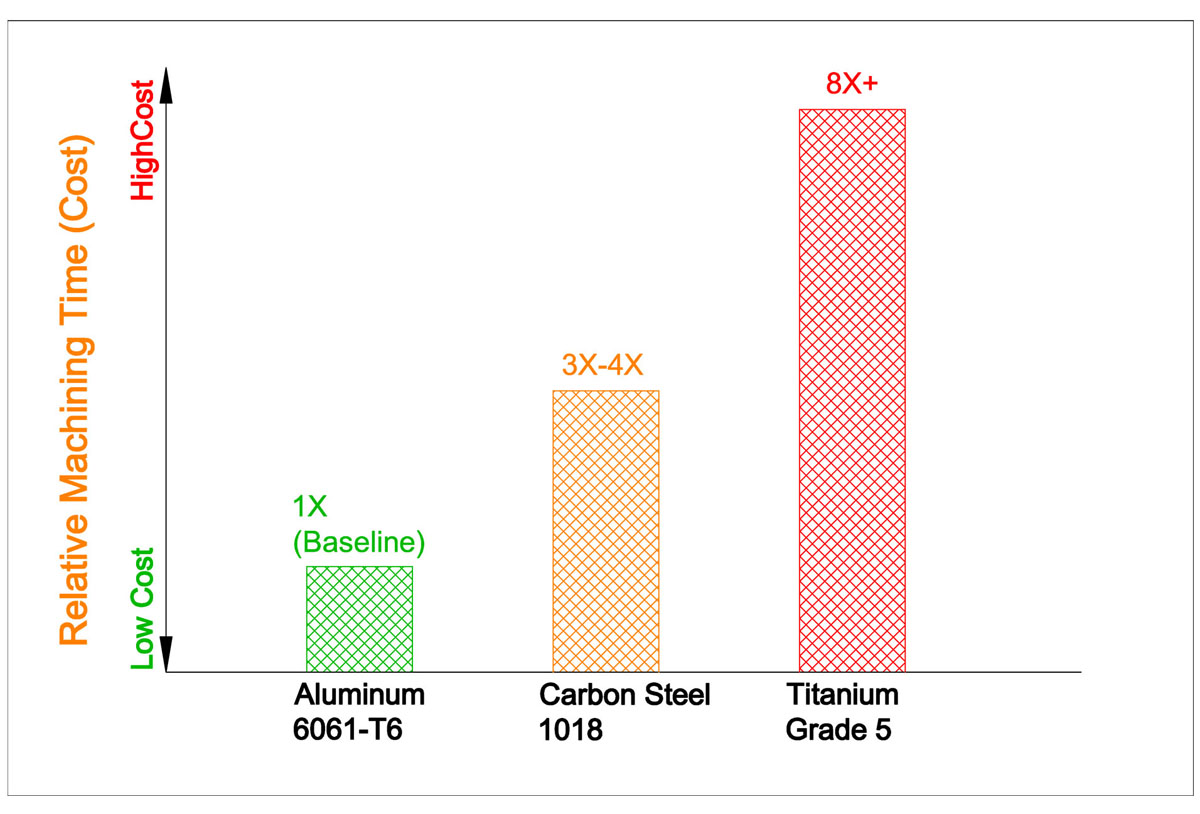
- Aluminum (e.g., 6061-T6): The gold standard for low-cost machining. It cuts like butter, allows for incredibly fast feed rates, and extends tool life. If your part does not require extreme strength or high-temperature resistance, default to Aluminum.
- Carbon and Alloy Steels (e.g., 1018, 4140): Steels take significantly more force to cut. They generate more heat and require slower feed rates than aluminum. Expect higher cycle times and increased tooling costs.
- Stainless Steels (e.g., 304, 316): Stainless steel is notorious for "work hardening"—meaning the metal gets harder as the tool cuts it. It requires rigid setups, specialized tooling, and very careful speed control.
- Titanium & Inconel: These superalloys have terrible machinability. They chew through expensive carbide tools and require agonizingly slow cutting speeds. Only specify these materials for extreme aerospace, medical, or high-temperature applications. If you are unsure whether your application’s environmental or structural loads require a high-cost superalloy, you can consult our engineering team to explore more cost-effective material alternatives before locking in your design.
The Rule: Do not over-specify your material. If Aluminum 6061 will survive the structural loads of your application, do not specify Stainless Steel 304 just to "be safe."
2. Milling vs. Turning: Choosing the Right Machine
The type of machine required to make your part dictates the baseline cost.
- CNC Turning (Lathes): If your part is primarily cylindrical (like a shaft, pin, or washer), it should be turned on a lathe. Turning is incredibly fast and cost-effective because the material spins continuously while a single-point cutting tool shapes it.
- CNC Milling: If your part is blocky or prismatic, it must go on a mill. Milling is generally slower than turning because the tool must travel back and forth across the part in discrete paths.
The Rule: Design for radial symmetry whenever possible. A cylindrical part turned on a lathe will almost always be cheaper than a rectangular part machined on a mill.
3. The Mill-Turn Advantage
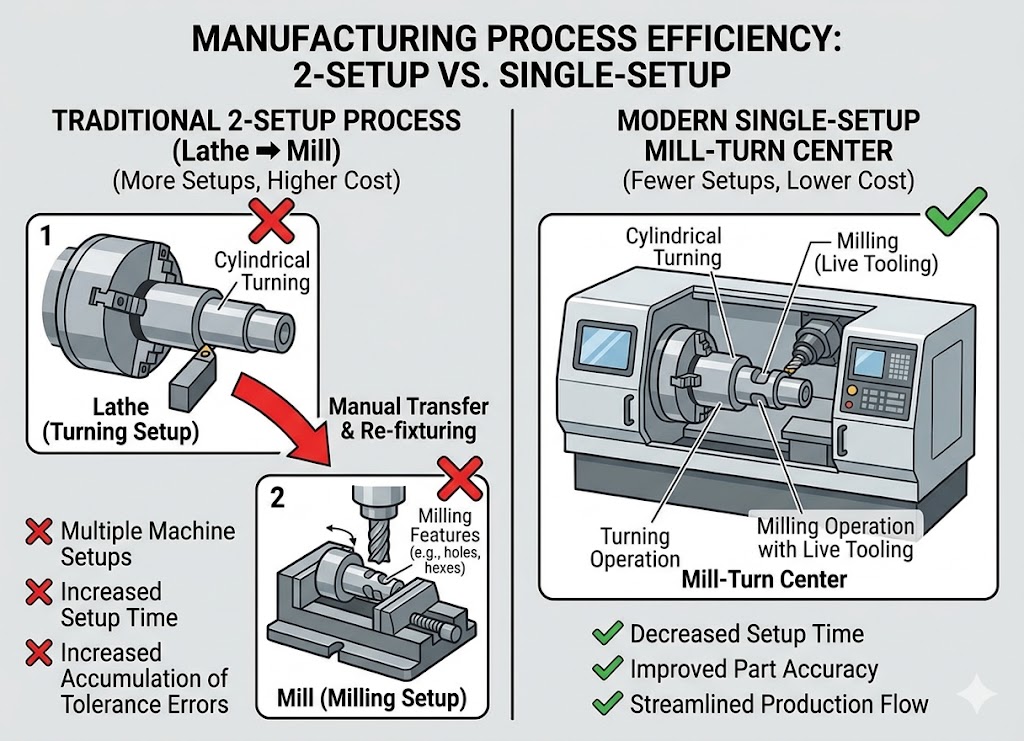
What happens if you have a cylindrical part (perfect for a lathe) but it needs a hex pattern milled into the top and holes drilled into the side (perfect for a mill)?
|
Optimizing for Multi-Axis Machining Combining milled and turned features into a single setup requires advanced machinery and precise offline programming. If you have a complex part, don't rely on rigid software quotes that penalize feature complexity. Upload your CAD files for an engineer-led CNC Machining Quote—our team manually reviews your part geometry to route it to the most cost-effective machine configuration. |
Historically, this meant paying for two setups: turning the blank on a lathe, then moving it to a mill. Today, you can design for Mill-Turn Centers. These advanced CNC lathes have "live tooling," meaning they can hold spinning end mills and drills. They can turn the cylinder, mill the hex, and drill the cross-holes all in one single, automated setup.
If you have a complex part, combining milled and turned features into a single piece can leverage mill-turn technology to drastically reduce setup costs.
4. Surface Finish (Ra) Cost Multipliers
The surface finish—measured in Roughness Average (Ra)—is determined by how fast the cutting tool moves across the material.
- As-Machined (Ra 3.2 µm / 125 µin): The most economical choice. The tool moves quickly, leaving visible but uniform tool marks.
- Fine Finish (Ra 0.8 µm / 32 µin): To achieve a smoother surface, the machinist must switch tools and take a microscopic "finishing pass" at a fraction of the standard speed. This can easily double the cycle time for that specific face.
The Rule: Leave all non-critical surfaces as standard "as-machined." Only call out tight Ra requirements on surfaces that require O-ring seals, bearing press fits, or critical sliding friction.
This article is part of our comprehensive guide to How to Reduce CNC Machining Costs: A Guide to Tolerances, Features, and Design.
Frequently Asked Questions
What is the most cost-effective aluminum alloy for general CNC machining?
Aluminum 6061-T6 is the absolute industry standard for cost-effective CNC machining. It offers excellent machinability, a high strength-to-weight ratio, good corrosion resistance, and is readily available in standard stock sizes, making it far cheaper to source and machine than specialty alloys like 7075 or 2024.
Why does a finer surface finish (lower Ra) increase the cost so dramatically?
To drop from a standard as-machined finish (Ra 3.2 µm) down to a fine finish (like Ra 0.8 µm), the CNC machine cannot simply run faster. The machinist must program a dedicated "finishing pass" using a specialized tool traveling at an incredibly slow feed rate. This extra processing time directly increases the machine cycle time you are billed for.
Can I save money by sourcing my own raw materials for production?
Generally, no. Commercial machine shops buy raw stock in high volumes directly from certified distributors and receive significant wholesale discounts. Sourcing your own materials usually introduces shipping delays, material certification liabilities, and higher administrative overhead, which cancels out any perceived savings.